I think I finally had fun with the blocks editor today. In fact, the process went so smoothly that I spent more time dreaming about (or was that researching) what I would do given the opportunity to travel to Paris than I did actually building the app. I am ready to create all sorts of map apps. My students could do this – identifying historical or significant land marks in math and photography. Viva le Apps!
Archive for Standard 2: Development
ED TECH 597: Working out the Bugs
This past week, the ladybug app left me with a few bugs of my own to work out. Developing an android app by following directions is challenging, but even more challenging is how I will apply my new knowledge to education. Of course there is the possibility of opening the MIT site up to my students, but what more? Will my experience in this course and my new found skills make an impact on the way I teach and learn? Will it make an impact on the way others learn?
I continue to be inspired by my peers as we struggle to extend the lessons and create something uniquely ours. Ego is thrown out the door as we post the difficulties that detain our progress. We voice our reasoning and words of encouragement flow. It’s a refreshing change from the scoffs and muttered name calling in secondary classrooms when a student attempts to clarify an answer, suppressing the natural desire to learn. I have a plan to help teach those students to react to one another with respect and compassion. Although I’m not a “gamer” I am inspired to use this app building process to encourage my students to collaborate and “work out the bugs” of education.
EDTECH597 Squeak & Buzz
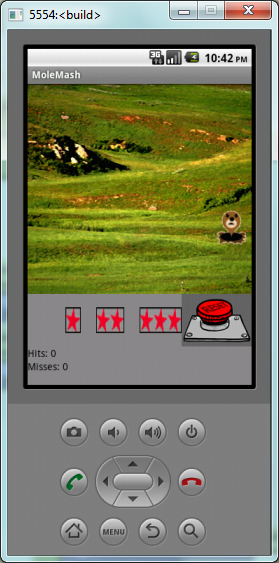
Moles and Apps have two things in common – they can be found just about anywhere and they are always popping up in new places. This week’s design project is a spin-off of the classic children’s arcade game where the player tries to keep rodents from popping up in a given area. After putting together the initial game, I put it to the test with my resident expert – my teenage daughter. She picked up the phone, clicked on a mole, and got a runtime error. “That’s strange, let me reload it.” Again it threw the same error. “Let me know when you get the bugs out” she said as she left the room. Much searching revealed that a block had inadvertently been slid over to the far reaches of the Blocks Editor window. Calling my daughter back, she assessed, tried, and mastered it in 8 seconds. “What did you think?” “BORing” After interrogating her, she admitted the “hit” vibration was okay, but complained catching the mole was too easy, and she lost interest with the plain background and lack of sounds.
Sounds were easy. I quickly found a few .mp3s that I liked at Sound FX Now and quickly incorporated them. I decided to let the user choose the difficulty level with star-ranked buttons. My mental design was progressing quickly toward reality, but I knew I was out of my league. I felt like a middle school student looking at a spreadsheet for the first time. APPrehension struck. How would I add the faster sprites without affecting the original? I am a problem solver. Using my experience with web design, I decided to create duplicate screens – each having successively complex images to distract the player, and each having a faster image sprite. Two hours later, I could not figure out how to get the star buttons to navigate to their respective screens. I consulted the text/tutorial again. This was not going to work. I reluctantly removed the Screens and the time they represented. Back to the blocks editor and the answer was there…all along.
My time spent developing screens 2 and 3 reinforced developing concepts. Figuring out how to get the levels I wanted on my own was victorious. Hearing my daughter’s “That’s cool, mom”…priceless.
ED TECH 597 – Stop&Go
App development might have seemed easy, but tonight Faith and Buffy knocked me out of my complacent attitude and geared me for a whole new paradigm of what is considered progress. The green light is on to proceed in this class and extend the tutorials to create apps with educational or instructional purposes. This past week I spent little time constructing and publishing my app. I feel hesitant of and clumsy with my new Android while I learn to navigate the basic functions of the device. The blocks editor refused to launch and I would turn my attention to another class or household chore. Finally, I could put off the task no longer. and I worked with the developer tools until I got the blocks editor running. From that point it only took about an hour to follow the tutorial and modify the app for my own purpose. I don’t use a lot of apps, so I am not creative in developing them yet. But thanks to these two pioneers, I do recognize that I am on the threshold of discovery.
EDTECH 597 Passport to AppDevelopment
(Originally Posted September 15, 2012) Apple or Android? After four years of using an iPhone, I recently entered the Android world and, like the iWorld I had just left behind, found tens of thousands of apps promising myriad ways to entertain, invest, organize,educate, and change my life. The difference is that in this world, I am a successful designer with my very own QR code leading to my very own Pocket-Kitty app
. After an easy setup on my phone and computer, I was able to develop the original app in 15 minutes. Not satisfied with that, I envisioned an animated app – and I had the two pictures to make it happen. Several hours and coffees later, I determined that I don’t yet have the necessary skill set to do what I want it to, but persistence and dedication will smile on me and I will push out my first app upgrade.
Once I completed the app assignment, I began thinking of ways I could create an app for my adult Emergency Medical Technician Course. Would it be an app that provides normal vital sign ranges for different age and body sizes or might it be a complex app that records all the activities performed in a certain time frame. No matter what I choose, one thing remains. I use Android.
EDTECH 504: Setting the course
It is ironical that life’s constants are chaos and strife. We humans must constantly adapt to change in an attempt to better future generations. In the past two weeks I attended a state-level competitive event for a student organization with six energetic adolescents, replaced a server, and analyzed volumes of raw data for errors in an attempt to improve our state’s reporting system. Not to mention the myriad activities performed at home as a week-end wife of my studious husband who is attending nursing school in a brick-and-mortar institution two hours north, and week-long mother of my ambitious high school freshman. It’s no small wonder clichés such as “pushing through walls” and “climbing ladders of success” pepper our vernacular.
Amid that race, I had the opportunity to stop, regroup, and refocus with what I thought would be a routine assignment. I haven’t performed an annotated bibliography since I earned my first master’s degree a dozen years’ past. What topic to select? I stewed on it until the due date loomed like a house rock in the middle of the boiling rapids. Of course! My reasoning behind this degree is to be able to help others in their struggle to change. As a professional technical educator with multiple academic endorsements and an accidental tourist in the IT department, I know a lot about educational theory, teaching in a classroom, IT issues, and design techniques but I don’t know much about the unique climate of the very population I want to serve.
I spent all afternoon with my research, growing more excited with my topic as I read and summarized. Ideas poured forth and began to pool together. Before I knew it, the project was complete. Despite a ten hour stretch of reading, I felt refreshed and motivated. I’m ready to take on the adventure of a research project on this topic and change my world.
EDTECH 501: Technology Use Planning Overview
The National Educational Technology Plan (2010) offers a non-prescriptive means of achieving the goals set forth by our nation’s educational leaders. Using it as a referance point provides a common lens through which to view our own objectives and progress towards those goals. In our district, technology planning committee members print out key segments to research and discuss at committee meetings. This blog features the main categories within this post to define how technology planning, implementation, and evaluation impact instruction and student learning.
Innovate and ScaleTeaching: Our district is miniscule. With 57 students in our junior/senior high school, technology offers students a competitive education that would be unavailable without synchronous and asynchronous online learning. Teachers are isolated in their subject areas, teaching six different flavors of their content area daily. Thanks to technology, the days of one person spewing forth knowlege are gone. From cutting-edge industry practices to details of ancient museum pieces, content delivery is supplmented with the vast resources of the Internet that brings a world of knowledge and ideas into the classroom.
Prepare and Connect: I am part of a team of instructional technology leaders made up of teachers, administrators, and other stake holders. Currently we are in the midst of developing a three-year tech plan to replace the existing plan that has met its useful life. Our past technology plan was designed for five years, as the State of Idaho had requested at the time. We have found it to be insufficient to address our expanding use of technology, even though it was beneficial in guiding our newly formed district in the path we are currently taking (our district is in its fifth year).
Infrastructure: Access and Enable: Previous to working in education, I worked in business management. One of the mantras of the day was to think/plan/act/evaluate with the end in mind. I believe that guideline rings true today. Even though we are designing a written technology plan, it’s the structure of our organization’s mission and vision statements that drives the adjustments needed when a new route or detour presents itself.
Assessment: Measure What Matters: Our committee recognizes that the planning stage is ongoing and needs flexibility as technological advances continually change the educational landscape. Because of this elasticity, we believe our tech plan should be designed for not longer than three years, which is in agreement with See (1992). I also am in agreement with See’s comment that “effective technology plans focus on applications, not technology.” Our committee strives to evaluate the effectiveness of current technological practices and endeavors to use technological and traditional methods to measure student achievement. The following example is how teachers in our dstrict have implemented student reponse pads, or “clickers.”
Productivity: Redesign and Transform After a committee determination that our district, teachers, and students would benefit from student response pads, we purchased a set for every classroom. The grant was written in such a manner that professional development for the integration of the devices was paramount to the technology. The first year, contracted trainers worked with teachers and teachers worked with one another redesigning their delivery and assessments to accomodate the devices. We experienced great success, with 75% of the teachers actively using their response pads and using the resulting data to steer their instruction. Students reported especially liking the instant feedback aspect of the systems. Three years later we have one teacher regularly using the response pads. What happened? Two key factors came into play resulting in technology without application: 1) administrative changes; 2) staff retirement, relocation, and replacing. The new staff does not have ownership in the decision, so they are reluctant to implement the devices because they do not see the added value. The unused clickers are waiting to shine, and Karen Roberts (1990) has provided me with 13 ways to bring them out of the storage closet and back into the hands of the students.
The National Education Plan (2010) and the articles provided at the National Center for Technology Planning have added insight and inspiration to the planning process that we are currently undertaking at our district.
Resources:
Robertson, K. (1990). PROMOTING TECHNOLOGY: 13 WAYS TO DO IT. Retrieved November 3, 2011, from National Center for Technology Planning: http://www.nctp.com/html/promoting_technology.cfm
See, J. (1992, May). Developing Effective Technology Plans. Retrieved November 8, 2011, from National Center for Technology Planning: http://www.nctp.com/html/john_see.cfm
U.S. Department of Education Office of Educational Technology. (2010). National Technology Plan 2010. Retrieved November 4, 2011, from ed.gov: http://www.ed.gov/sites/default/files/netp2010.pdf