Archive for Standard 3: Utilization

EDTECH 506 Learning by Design

Visual representation plays a vital role in my life. I remember putting on my first set of glasses and realizing for the first time what a difference detail makes in our world view. That impression gave way to a lifelong study of detail that impacts every aspect of my life. The past weeks in this course are no exception as I considered what is universal design, what would be a useful unit of instruction, and how might I best represent myself through visual clues. After submitting the project plan, I nearly changed topics when reading the typography assignment. How might I create what I might consider illustrated text that conveys meaning. I was surprised to find that the exercise, though challenging, was a pleasant task.

Four Words

Vital words for bleeding control and shock management unit of instruction.


When referring to Mayer’s (2001) research, Lohr emphasizes that “visuals be designed so that they support cognitive processes of selection, organization, and integration” to maximize learning (2008 p.63). Using that formula, I hope to create a unit of instruction that will be easily remembered, and easily implemented when conditions call for it. After all, “a picture is worth a thousand words.”

Reference
Lohr, L. (2008). Creating graphics for learning and performance: lessons in visual literacy (2 ed.). Upper Saddle River, NJ: Merrill. Retrieved 2012

Leave a Comment

EDTECH597 Squeak & Buzz

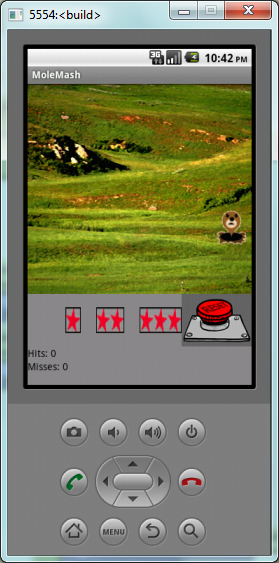
Moles and Apps have two things in common – they can be found just about anywhere and they are always popping up in new places. This week’s design project is a spin-off of the classic children’s arcade game where the player tries to keep rodents from popping up in a given area. After putting together the initial game, I put it to the test with my resident expert – my teenage daughter. She picked up the phone, clicked on a mole, and got a runtime error. “That’s strange, let me reload it.” Again it threw the same error. “Let me know when you get the bugs out” she said as she left the room. Much searching revealed that a block had inadvertently been slid over to the far reaches of the Blocks Editor window. Calling my daughter back, she assessed, tried, and mastered it in 8 seconds. “What did you think?” “BORing” After interrogating her, she admitted the “hit” vibration was okay, but complained catching the mole was too easy, and she lost interest with the plain background and lack of sounds.

Try to stop the moles from overtaking the prairie


Sounds were easy. I quickly found a few .mp3s that I liked at Sound FX Now and quickly incorporated them. I decided to let the user choose the difficulty level with star-ranked buttons. My mental design was progressing quickly toward reality, but I knew I was out of my league. I felt like a middle school student looking at a spreadsheet for the first time. APPrehension struck. How would I add the faster sprites without affecting the original? I am a problem solver. Using my experience with web design, I decided to create duplicate screens – each having successively complex images to distract the player, and each having a faster image sprite. Two hours later, I could not figure out how to get the star buttons to navigate to their respective screens. I consulted the text/tutorial again. This was not going to work. I reluctantly removed the Screens and the time they represented. Back to the blocks editor and the answer was there…all along.
My time spent developing screens 2 and 3 reinforced developing concepts. Figuring out how to get the levels I wanted on my own was victorious. Hearing my daughter’s “That’s cool, mom”…priceless.

Comments (1)

ED TECH 597 – Stop&Go

App development might have seemed easy, but tonight Faith and Buffy knocked me out of my complacent attitude and geared me for a whole new paradigm of what is considered progress. The green light is on to proceed in this class and extend the tutorials to create apps with educational or instructional purposes. This past week I spent little time constructing and publishing my app. I feel hesitant of and clumsy with my new Android while I learn to navigate the basic functions of the device. The blocks editor refused to launch and I would turn my attention to another class or household chore. Finally, I could put off the task no longer. and I worked with the developer tools until I got the blocks editor running. From that point it only took about an hour to follow the tutorial and modify the app for my own purpose. I don’t use a lot of apps, so I am not creative in developing them yet. But thanks to these two pioneers, I do recognize that I am on the threshold of discovery.

Leave a Comment

EDTECH 501: As of then…

I was in eighth grade when I fell in love with—and got into trouble because of—a …calculator. This grey HP beauty that my mining engineer/surveyor father used and treasured was a formative part of of my affinity towards technology. It was wieldy by today’s standards, and featured popping buttons with color-coded functions.

My father was impressed with its ability to remember complex strings of entries and was fascinated with the full color user manual, all 120 pages! My friends were impressed with the ability of the display to spell a “swear word” when I typed in 7734 and turned the device upside down (that happened only once in class – the teacher confiscated the distracting gadget and my dad had to come retrieve his $200 calculator).

You can try out the HP-25, which was the same device but did not include the continuous memory. This link will take you to a Java simulation from the Museum of HP Calculators (Hicks, 2010). The applet code (Leinweber, 1998) is public domain. The simulation is not completely functional, but you’ll easily be able to perform basic mathematical functions. Mouse over for tool tips (displayed on the title bar of the window).

References:
Hicks, D. (2010). HP-25C. Retrieved September 6, 2011, from The Museum of HP Calculators: http://www.hpmuseum.org/hp25C.htm

Leinweber, L. (1998). HP Calculator Simulations. Retrieved September 6, 2011, from HP Calculator Museum: http://www.hpmuseum.org/simulate/simulate.htm#java25

Leave a Comment

EDTECH 501: Technology Use Planning Overview

The National Educational Technology Plan (2010) offers a non-prescriptive means of achieving the goals set forth by our nation’s educational leaders. Using it as a referance point provides a common lens through which to view our own objectives and progress towards those goals. In our district, technology planning committee members print out key segments to research and discuss at committee meetings. This blog features the main categories within this post to define how technology planning, implementation, and evaluation impact instruction and student learning.
Innovate and ScaleTeaching: Our district is miniscule. With 57 students in our junior/senior high school, technology offers students a competitive education that would be unavailable without synchronous and asynchronous online learning. Teachers are isolated in their subject areas, teaching six different flavors of their content area daily. Thanks to technology, the days of one person spewing forth knowlege are gone. From cutting-edge industry practices to details of ancient museum pieces, content delivery is supplmented with the vast resources of the Internet that brings a world of knowledge and ideas into the classroom.
Prepare and Connect: I am part of a team of instructional technology leaders made up of teachers, administrators, and other stake holders. Currently we are in the midst of developing a three-year tech plan to replace the existing plan that has met its useful life. Our past technology plan was designed for five years, as the State of Idaho had requested at the time. We have found it to be insufficient to address our expanding use of technology, even though it was beneficial in guiding our newly formed district in the path we are currently taking (our district is in its fifth year).
Infrastructure: Access and Enable: Previous to working in education, I worked in business management. One of the mantras of the day was to think/plan/act/evaluate with the end in mind. I believe that guideline rings true today. Even though we are designing a written technology plan, it’s the structure of our organization’s mission and vision statements that drives the adjustments needed when a new route or detour presents itself.
Assessment: Measure What Matters: Our committee recognizes that the planning stage is ongoing and needs flexibility as technological advances continually change the educational landscape. Because of this elasticity, we believe our tech plan should be designed for not longer than three years, which is in agreement with See (1992). I also am in agreement with See’s comment that “effective technology plans focus on applications, not technology.” Our committee strives to evaluate the effectiveness of current technological practices and endeavors to use technological and traditional methods to measure student achievement. The following example is how teachers in our dstrict have implemented student reponse pads, or “clickers.”
Productivity: Redesign and Transform After a committee determination that our district, teachers, and students would benefit from student response pads, we purchased a set for every classroom. The grant was written in such a manner that professional development for the integration of the devices was paramount to the technology. The first year, contracted trainers worked with teachers and teachers worked with one another redesigning their delivery and assessments to accomodate the devices. We experienced great success, with 75% of the teachers actively using their response pads and using the resulting data to steer their instruction. Students reported especially liking the instant feedback aspect of the systems. Three years later we have one teacher regularly using the response pads. What happened? Two key factors came into play resulting in technology without application: 1) administrative changes; 2) staff retirement, relocation, and replacing. The new staff does not have ownership in the decision, so they are reluctant to implement the devices because they do not see the added value. The unused clickers are waiting to shine, and Karen Roberts (1990) has provided me with 13 ways to bring them out of the storage closet and back into the hands of the students.
The National Education Plan (2010) and the articles provided at the National Center for Technology Planning have added insight and inspiration to the planning process that we are currently undertaking at our district.

Resources:
Robertson, K. (1990). PROMOTING TECHNOLOGY: 13 WAYS TO DO IT. Retrieved November 3, 2011, from National Center for Technology Planning: http://www.nctp.com/html/promoting_technology.cfm
See, J. (1992, May). Developing Effective Technology Plans. Retrieved November 8, 2011, from National Center for Technology Planning: http://www.nctp.com/html/john_see.cfm
U.S. Department of Education Office of Educational Technology. (2010). National Technology Plan 2010. Retrieved November 4, 2011, from ed.gov: http://www.ed.gov/sites/default/files/netp2010.pdf

Leave a Comment

EDTECH501: APA 1.6 using Zotero and Google Scholar

I have found the best thing since EndNote in a combo punch, and I am shamelessly endorsing them for the scholarly as well as those who are, well..less drawn to scholarly activities.

I eagerly partnered with Zotero for the software’s ability to organize my myriad wanderings and ponderings on the world wide web.  Google Scholar is another lens that brings to focus the articles I need to extract the information I am looking for – in this case, mobile learning. I am including five correct APA citations as examples of the genius of Zotero. For a quick look at the FireFox plug-in, I chose to embed Arial’s tutorial. She has a few distracting “ums” and “uhs,” but her style captured my interest.

References

Adkins, S. S. (2008). Ambient Insight. The US Market for Mobile Learning Products and Services: 2008-2013 Forecast and Analysis (p. pp. 5). Retrieved from http://www.ambientinsight.com/Resources/Documents/AmbientInsight_2008-2013_US_MobileLearning_Forecast_ExecutiveOverview.pdf

Enabling Mobile Learning (EDUCAUSE Review) | EDUCAUSE. (n.d.). Retrieved October 24, 2011, from http://www.educause.edu/EDUCAUSE+Review/EDUCAUSEReviewMagazineVolume40/EnablingMobileLearning/157976

Masters, K. (2005). Seeing, Understanding, Learning in the Mobile Age. Low-key m-learning: a realistic introduction of m-learning to developing countries. Budapest, Hungary, April 2005. Retrieved from http://www.fil.hu/mobil/2005/Masters_final.pdf

Mobile Learning History. (2010).Mobile Learning Community. Retrieved from http://trainandgo.blogspot.com/2010/01/mobile-learning-in-cortina.html

Moore, J. (2009). Proceedings of IADIS International Conference Mobile Learning. A portable document search engine to support off-line mobile learning. Barcelona, Spain. Retrieved from http://eprints.ecs.soton.ac.uk/17441/

Leave a Comment

EDTECH 501: Plagiarism; Resist the Temptation!

Plagiarism (Latin plagiare “to kidnap”)


Plagiarism
by: brimstef

http://www.xtranormal.com/xtraplayr/12517753/plagiarism

This video (Brimacomb, 2011) covers using someone else’s work as my own (in this case “buying” a paper from a website), copy and pasting without citations, and using my own prior work without instructor permission. As these two college students talk about whether or not to go to the beach with friends, I incorporated something that I learned on this project. I was intrigued by the root (Latin “kidnap”), and found it to be useful in the script. Xtranormal is a new medium for me. I was impressed by the animation, but found the text readers somewhat difficult to understand. Nevertheless, I was excited to see how my video-graphics students became immediately engaged. I wish I could accumulate points rather than purchase them. It would make the experience more enjoyable. I used the Salmon River Joint School District Trustees’ Policy Manual (2009) as my source rather than the BSU Code of Conduct (2011), because I want to embed my video onto my high school’s home page to emphasize the three aspects of plagiarism.

REFERENCES:
Boise State University (2011). Student Conduct Program – Code of Conduct – Article 4. Retrieved October 3, 2011, from Boise State University Code of Conduct: http://osrr.boisestate.edu/scp-codeofconduct-article4/

Brimacomb, S. (2011, October 3). Plagiarism. Retrieved October 3, 2011, from XtraNormal: http://www.xtranormal.com/watch/12517753/plagiarism

Brimacomb, S. (2011, October 3). Plagiarism Video Discussion Forum. Retrieved October 4, 2011, from EDTECH Boise State EDTECH 501-4175 (FA11): http://edtech.mrooms.org/mod/forum/discuss.php?d=28525

Salmon River Joint School District Trustees. (2009, April 1). Policy 3202. Retrieved September 29, 2011, from Salmon River Joint School District 243: http://www.jsd243.org/2032101210144059403/lib/2032101210144059403/3202.pdf

Leave a Comment

EDTECH 501: Digital Equality?

Online learning seems to be the pathway to enlightenment for some and the pathway to, well….disenchantment for others. Still others may never know because they don’t have the opportunity to–or choose not to–pursue the experience. After spending several weeks trying to collaborate with my virtual team across time zones and amidst the normalcy of chaos at work and at home, I realized that online learning is far more difficult than face-to-face learning. This coming from a veteran digi-learner, no less, who lives in a society whose core values lie in industry and growth.  All this collaborating and near-instantaneous global publishing is made possible by technology that was unavailable to me after graduating from high school in the early 80’s. However, not knowing your peers and instructors impersonalizes the learning experience in a way that creates a digital divide of its own. 

The primary digital divide I noticed when researching this project is that of those who use technology and those who don’t (by choice or by circumstance is irrelevant). To what future are our digital natives (Prensky, 2001) embarking? What of our society’s values will they retain, and what values will they relinquish as the digital nature of information seeps into every aspect of their lives. Will they be more comfortable collaborating with virtual peers, or will they long for the person to person interaction that only a traditional course can offer?

After completing this assignment with four highly competent digi-partners, I am of the opinion that there is less a digital divide than a digital inequality. The inequality stems from those who know how to, and have a desire to, manipulate the myriad venues of information to gain new understanding and knowledge and those who mainly use the speed and accessibility for social pursuits.

Because I prefer balance, I felt that our final choice would address the needs of the inequality,  yet bridge the gap left by the digital divide.  Watch our VoiceThread presentation, and let me know what you think.

REFERENCES
Prensky, M. (2001, October 5). Digital Natives, Digital Immigrents. On the Horizon. University Press. Boston Retrieved September 25, 2011 from http://www.marcprensky.com/writing/Prensky%20-%20Digital%20Natives,%20Digital%20Immigrants%20-%20Part1.pdf


Leave a Comment

EDTECH 541 2011 Summer-y

I used to be an IT  know-it-all…one of those people whom others would seek out for technological advice and help, and for whom nothing could not be conquered with a work-around. But my days were numbered and  I knew with every passing week that my superior skills were evaporating into  the chasm of once-was.  So I decided to pursue another graduate degree and give my rusty mental circuits new pathways on which to travel.

EdTech541 looked interesting and right up my alley. With its promise of web design and technology integration, I greedily reached for the new information. Then my life hit a road bump and sent me in a new direction. Despite all the uncertainty, I was still able to produce a product that I will use in teacher professional development and other adult learning environments.

By week four, I had just found out that my daughter needed serious medical attention for what was initially presumed to be a common urinary tract infection. I toyed with dropping the courses, knowing that I was going to be driving a lot given the distance between specialists. I e-mailed my instructors asking if I should drop the courses, but heard no indication that I should do so, and after the weekend determined to go for it.  I had never struggled so hard in my life to understand concepts as I have this summer. I have been consistently late in my coursework in every class – watching my elitist ego plummet along with my perfect GPA. 

One can’t get too far in education without learning about Maslow’s hierarchy of needs, and this summer my educational goals were trumped by my family’s need. The constant stress and worry has put theory into practice.  My ability to learn was physically diminished as my clarity of thinking was constantly interrupted by professional, service, educational, and personal demands.  Lack of sleep robbed me of optimism. Every assignment took twice as long as it probably should have to complete , and I spent hours revising mistakes I had made. What I did learn was that I have become inflexible and (probably) unapproachable with my own face to face students. I want to remember my summer’s experience in order to give students the benefit of the doubt while at the same time, holding them accountable for the tasks that have been assigned.

One benefit was the hours spent in waiting rooms gave me time to read the course text. I am an ISTE member, and use the NETS standards (2010) in course development and teacher professional development, so I was excited to see the course text use these professional standards as a foundation for the tasks at hand.

I am trying to convince my technology committee, administration, and school board to allow personal mobile devices within the school building. I believe the future is now, and when we insist that our students disconnect from their devices, we are fostering a disconnect from their education.  This course has given me tools to use to present research-based evidence that technology integration improves learning. The key is planning. Teachers must plan for activities that are rich with technology rather than letting technology activities take the place of teaching.

I have always been partial to inquiry-based theories, although I am open to discussion about other schools of thought, as well. This might be evident in a review of my database lesson plan. Although not an original plan, developing the database lesson to fit students in our geographic area took time because I had to develop questions that could be researched and answered, and determine the modifications necessary to make it a local fit.  My most beneficial assignment was that in which we identified strategies across the curriculum. My resources page keeps growing – not to impress anyone, but so that I won’t forget what I want to take back to my colleagues in the fall. This course will be beneficial for years to come as I use the products that I developed in my job as IT coordinator.

I performed an assistive technologies review three years ago when a student of mine  was involved in a water rescue. He experienced severe back injuries from a diving accident and is quadriplegic a resulting tracheotomy left him speechless. At the time tablets were not yet on the market, but he did have a school-issued laptop for at-home and school use. To repeat the research such a short time later has fostered astonishing results. Technologies such as voice to text (or vice versa) that were unavailable or were cost prohibitive at that time  now have presence in the $.99 iApps-Market.  I found the authors of our text making an interesting observation about beginning with low-tech solutions before moving into high tech as the needs dictate (p. 412)

I found blogging to be a perfect fit for reflection, but having to blog for a number of courses along with discussion forums left little allowance for reflective practice in such a compressed course. Even without other events in my life, writing takes time and revision and I always feel my blogs are somehow lacking consistent depth and detail. I do however, prefer the conversational style of a blog over the formality of an essay, as Richard Mayer (2004) is quoted in our text.

As I pointed out earlier, timeliness was lacking in all that I did this summer. My responses are lacking as well. Of the 235 points on blogging, I would be surprised to receive 180 points.

All in all, it has been a great course. The instructor modeled the concepts taught and I would highly recommend it to colleagues whether or not they plan to teach or develop online courses.

References:

International Society for Technology in Education. (2010). Standards. Retrieved June 13, 2011, from ISTE: http://www.iste.org/standards/nets-for-students.aspx

Mayer, R., Fennell, S., and Farmer, L. (2004). A personalization effect in multimedia learning. Journal of Educational Psychology. 96(2), 389-395.

Robleyer, M., & Doering, A. (2010). Educational Technology Into Teaching (Fifth ed.). Allyn and Bacon, Pearson.

Leave a Comment

EDTECH 541: Extraordinary Times for Extraordinary Needs

At any given moment, lives change.

I serve as a volunteer advanced EMT on a rural ambulance. During my eight years of service, I have experienced exhilarating triumph and painful tragedy. With each call I become more acutely aware of both the fragility and the resilience of human life. I have learned that it takes only one act (intentional or unintentional), or one bodily systems failure to change lives. A stroke may leave an individual unable to use his right arm. In most activities, this impairment may be minimal – but in other activities which require the use of both arms, this loss puts our friend at a disadvantage with others – it becomes a disability. If the impairment or disability inhibits the individual from fulfilling a role, it becomes a handicap  (Robleyer & Aaron, 2010).

This change impacts the individual, his loved ones, and his environment. The impact can be temporary or permanent.

A few months back I watched an interview with Roger Ebert, a high-profile movie critic who spent a lifetime providing movie goers details about the latest box office releases without giving away the plot. His account of his experience with jaw cancer was touching and inspirational. His face, surgically shaped into a comical expression of happiness, fit well with his positive outlook on life. His voice had vanished and in its place was a technological wonder—a text-to-voice application that allowed this man his vocal contributions, and he was making every word count.

Anyone who performs a comprehensive search of emerging technologies will find that no matter the disability, technology can facilitate a better living experience than one would have had just a decade ago. Astounding!

For whatever reason, human nature causes most people discomfort around those who experience physical or mental disfigurement.  In all but rare situations their voices go unheard. It’s about time we listen because in the next moment, the lives that change might be ours.

References:

Robleyer, M., & Aaron, D. (2010). Educational Technology Into Teaching (Fifth ed.). Allyn and Bacon, Pearson.


Leave a Comment

« Newer Posts · Older Posts »